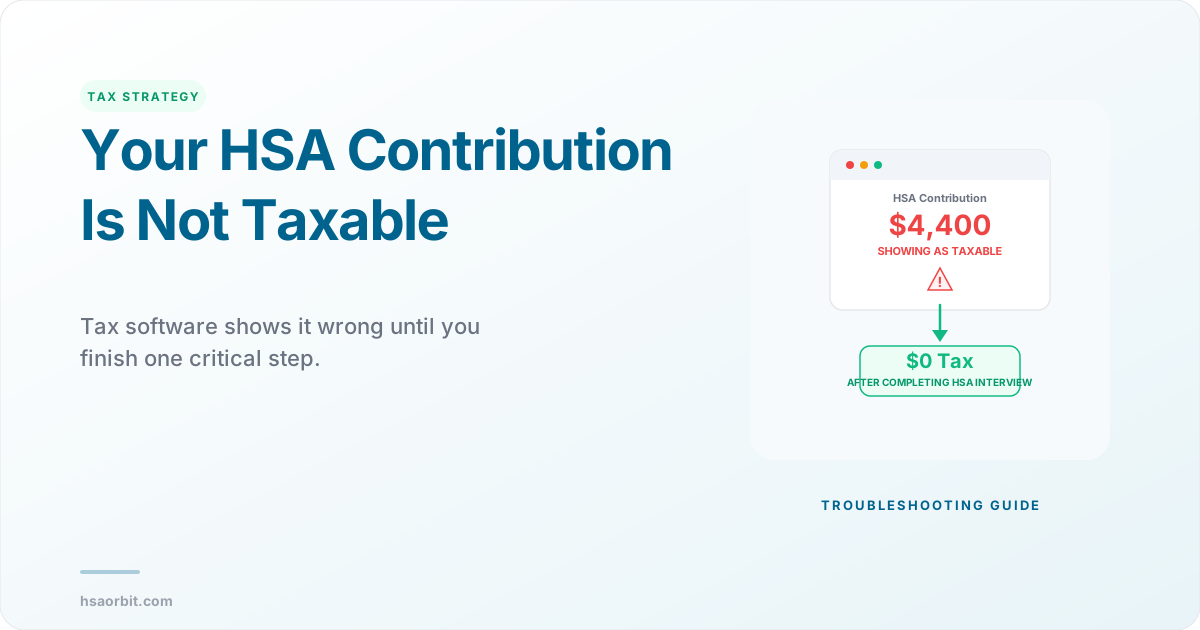
You entered your W-2, added your HSA information, and your tax software suddenly says your HSA contribution is taxable income. Your expected refund dropped by hundreds of dollars, and now you are staring at a number that makes no sense. This is one of the most common HSA tax filing problems, and in nearly every case the fix takes less than five minutes. The issue is almost always a data entry problem, not an actual tax problem. This guide explains the five scenarios that cause tax software to misclassify your HSA contribution as taxable, walks you through the exact fix in TurboTax, FreeTaxUSA, and H&R Block, and shows you how to verify your Form 8889 is correct before you file.
The reason this happens so often is that HSA contributions flow through your tax return in a way that is not intuitive. Pre-tax payroll contributions are already excluded from your W-2 Box 1 wages. Direct contributions need a separate deduction on Form 8889. And tax software processes these in stages, sometimes showing an intermediate result that looks wrong before the final calculation is complete. Understanding which type of contribution you made and how your software handles it is the key to resolving the confusion.
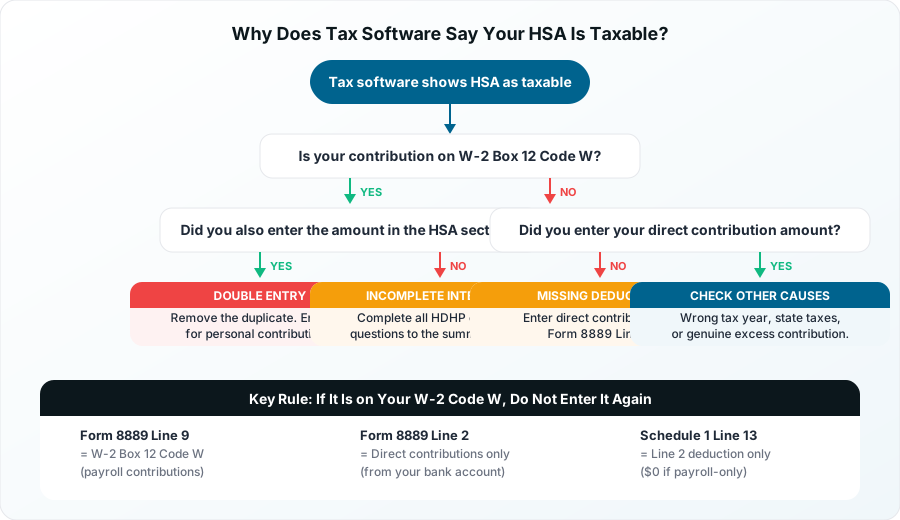
The Five Reasons Tax Software Shows Your HSA as Taxable
- Double entry - you re-entered your W-2 Box 12 Code W amount as an HSA contribution
- Incomplete interview - you exited the HSA section before confirming HDHP coverage
- Missing Line 2 entry - you made direct contributions but did not enter them for the deduction
- Wrong tax year - a prior-year contribution was entered for the current year
- State taxes - California and New Jersey tax HSA contributions at the state level
How HSA Contributions Are Supposed to Reduce Your Taxes
Before diagnosing the problem, you need to understand the two paths an HSA contribution can take through your tax return. The path determines whether you see a deduction, and where.
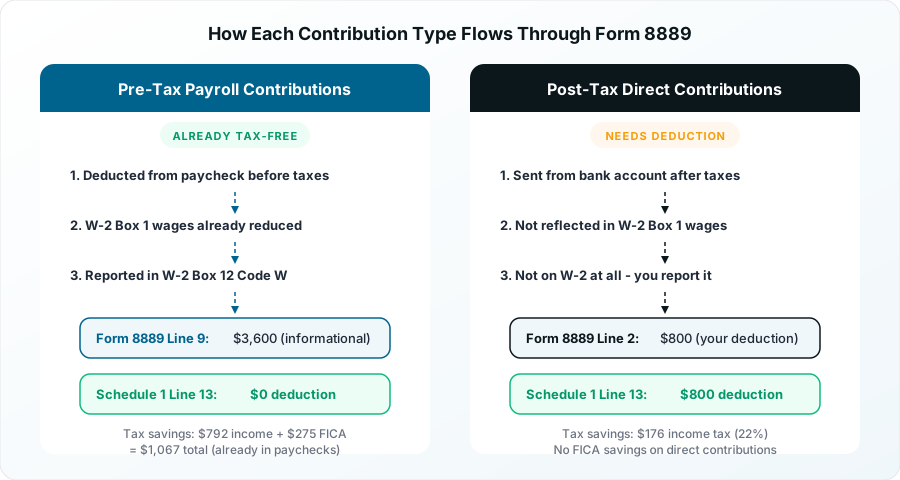
Pre-Tax Payroll Contributions (W-2 Box 12 Code W)
If your employer deducts HSA contributions from your paycheck before taxes, the money never appears in your taxable wages. Your W-2 Box 1 already reflects the reduced amount. The contribution shows up in Box 12 with Code W, which reports the combined total of your payroll deductions and any employer match or seed contribution. The IRS explains this mechanism in Publication 969, which treats all cafeteria plan HSA contributions as employer contributions.
Because the tax benefit already happened at the payroll level, you do not claim a deduction for this amount on your tax return. The money flows to Form 8889 Line 9 as an informational entry. The IRS uses it to verify you did not exceed the contribution limit, but it does not create an additional deduction. Your tax bill should not change when you enter this number correctly.
A person in the 22% federal bracket who contributes $4,400 through payroll saves $968 in federal income tax plus $336 in FICA taxes. That $1,304 in savings already happened through each paycheck. You should not see the savings again on your return.
Post-Tax Direct Contributions (Form 8889 Line 2)
If you contributed to your HSA directly from your bank account, after taxes were withheld from your paycheck, you get an above-the-line deduction. You enter this amount on Form 8889 Line 2, and the deduction flows to Schedule 1 Line 13. This directly reduces your adjusted gross income and lowers your tax bill.
This is the scenario where you should see your refund increase (or your balance due decrease) when you enter the contribution. If it does not change, the contribution was not entered correctly.
Good to Know
Pre-tax payroll contributions save you FICA taxes (7.65%) that direct contributions do not. If you have the option to contribute through payroll, the payroll path saves an extra $336 on a $4,400 self-only contribution compared to contributing directly from your bank account.
The Number One Reason Tax Software Shows Your HSA as Taxable Income
The most common cause of this problem is double entry. Here is exactly how it happens, and it affects the majority of W-2 employees who contribute through payroll.
The Double-Entry Trap
- You enter your W-2 in the income section. The software reads Box 12 Code W and records your $4,400 HSA contribution
- You navigate to the HSA or deductions section. The software asks "How much did you contribute to your HSA this year?"
- You enter $4,400 again, because that is how much you contributed
- The software now thinks you contributed $8,800 total: $4,400 from the W-2 (already tax-free) plus $4,400 you just entered (which it treats as a separate direct contribution)
- Since $8,800 exceeds the $4,400 self-only limit, the software flags $4,400 as an excess contribution and adds it back to your taxable income
The result: your refund drops, you see a phantom excess contribution, and the software may calculate a 6% excise tax penalty that you do not actually owe.
Why This Happens
The question "How much did you contribute to your HSA?" is misleading. Tax software is asking specifically about direct contributions you made outside of payroll. If all your contributions came through your employer's payroll system, the answer to this question is zero. The software already captured your payroll contributions from W-2 Box 12 Code W.
This is the single most important rule for HSA tax filing: if your contribution is on your W-2, do not enter it again.
Important
The IRS definition of "employer contribution" includes your payroll deductions. When tax software asks about "employer contributions," it means everything in W-2 Box 12 Code W, including the portion deducted from your paycheck. The IRS treats all Section 125 cafeteria plan HSA contributions as employer contributions, even though the money came from your salary.
How to Fix HSA Contribution Errors in TurboTax, FreeTaxUSA, and H&R Block
Each tax software handles the HSA interview differently. Below are the exact steps to fix the problem in the three most popular platforms.
TurboTax
TurboTax has a specific behavior that catches many users off guard. When you enter a W-2 with Box 12 Code W, TurboTax temporarily adds the amount to "Other Income" on your return. This is by design. TurboTax removes it only after you complete the full HSA interview and confirm your HDHP coverage.
Step-by-step fix:
- Go to Federal > Deductions & Credits
- Scroll to Medical and find 1099-SA, HSA, MSA
- Click Start (or Update if you already started)
- Answer the HDHP coverage questions: coverage type (self-only or family), months covered, and whether you were eligible for the full year
- When asked "Enter your HSA contributions" - enter ONLY direct contributions you made from your personal bank account. If all contributions were through payroll, enter $0
- Complete the interview through to the HSA Summary page. Do not exit early
- Verify: Go to Tax Tools > Tools > View Tax Summary > Preview My 1040. Check that Form 8889 Line 9 shows your W-2 Code W amount and Line 2 shows only your direct contributions (or $0)
Critical: If you exit the HSA interview before reaching the summary page, TurboTax may leave the Code W amount in Other Income. The full interview must be completed for the deduction to process correctly.
FreeTaxUSA
FreeTaxUSA presents a contributions page that can cause double-counting if you are not careful about which field you use.
Step-by-step fix:
- Go to Deductions/Credits > Health Savings Account (HSA)
- If you received a 1099-SA, enter it first
- On the contributions page, FreeTaxUSA asks about contributions not through your employer
- Enter ONLY the amount you contributed directly from your bank account. Do not re-enter the W-2 Code W amount
- If FreeTaxUSA shows a "Potentially Doubled HSA Contributions" alert, review your entries and remove the duplicate
- Verify: Preview your return and check Form 8889. Line 9 should match your W-2 Code W. Line 2 should show only direct contributions
H&R Block
H&R Block requires you to explicitly enable the HSA section in your return.
Step-by-step fix:
- Go to Federal > Deductions and ensure Health Savings Account is checked
- Complete the HSA interview questions about coverage type and eligibility
- When asked about contributions, enter only direct (post-tax) contributions
- If asked "Did your employer contribute to your HSA?" answer Yes if you see any amount in W-2 Box 12 Code W, even if all the money came from your paycheck. The IRS considers payroll deductions as employer contributions
- Verify: Review your return and check that Form 8889 Line 9 matches your W-2 Code W
Pro Tip
Quick verification for any tax software: After completing the HSA section, check your Form 8889 in the return preview. Line 9 should equal your W-2 Box 12 Code W. Line 2 should contain only direct contributions. Line 13 (your deduction) should equal Line 2 or be $0 if you only contributed through payroll. If Line 13 shows a large deduction when all your contributions were pre-tax, you have a double-entry problem.
Other Reasons Your HSA Contribution Appears Taxable
Double entry is the most common cause, but it is not the only one. Here are four additional scenarios that can make your HSA contribution look taxable in your tax software.
You Did Not Complete the HDHP Coverage Questions
Tax software cannot apply the HSA tax benefit until it confirms you had qualifying High Deductible Health Plan coverage. If you skip the coverage questions or answer them incorrectly (for example, saying you were covered for zero months), the software treats your entire contribution as ineligible and adds it to your taxable income.
Fix: Go back to the HSA section and verify that your coverage type (self-only or family) and the number of months you were covered are correct. If you had HDHP coverage all 12 months, select "full year."
You Made Direct Contributions But Did Not Enter Them
This is the opposite problem from double entry. If you contributed directly to your HSA from your bank account and never entered the amount in your tax software, you are missing a deduction you are entitled to. Your tax software did not add anything to your income, it just failed to subtract the deduction.
Fix: Enter your direct contribution amount in the HSA section of your software. It goes on Form 8889 Line 2 and creates an above-the-line deduction on Schedule 1 Line 13. This should reduce your taxable income and increase your refund.
You Entered a Prior-Year Contribution for the Wrong Year
Contributions made between January 1 and April 15 can be designated for either the current or prior tax year. If you made a prior-year contribution in February 2026 designated for 2025, it belongs on your 2025 return, not your 2026 return. If you enter it on the wrong year's return, it creates an excess contribution that gets taxed.
Fix: Confirm which tax year the contribution was designated for. Check with your HSA custodian if you are unsure. Enter the contribution on the correct year's return only.
You Live in California or New Jersey
California and New Jersey do not recognize HSA tax benefits at the state level. If you live in either state, your HSA contributions will appear as taxable income on your state return even when everything is correct on your federal return. Your W-2 Box 16 (state wages) will be higher than Box 1 (federal wages) by the amount of your HSA contribution.
This is not an error. It is how these two states treat HSAs. There is no fix because the state intentionally taxes HSA contributions, earnings, and in California's case, capital gains within the HSA.
How to Verify Your Form 8889 Is Correct
After fixing the issue in your tax software, you need to verify that Form 8889 is calculated correctly. Here is a line-by-line check using a concrete example.
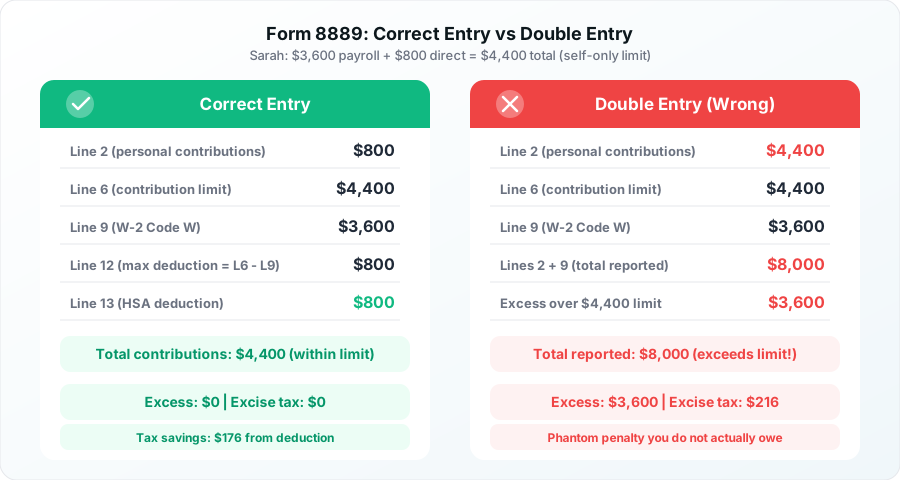
Example: Sarah's HSA Contributions
Sarah is 35, has self-only HDHP coverage for all 12 months of 2026, and made two types of contributions:
- $3,600 through payroll (W-2 Box 12 Code W)
- $800 directly from her bank account in March
Her total contributions: $4,400 (the 2026 self-only limit)
What Form 8889 Should Show
| Form 8889 Line | Description | Correct Amount |
|---|---|---|
| Line 2 | Personal direct contributions | $800 |
| Line 6 | Contribution limit (self-only coverage) | $4,400 |
| Line 9 | Employer/payroll contributions (W-2 Code W) | $3,600 |
| Line 12 | Maximum deduction (Line 6 minus Line 9) | $800 |
| Line 13 | HSA deduction (smaller of Line 2 or Line 12) | $800 |
Sarah's $800 deduction flows to Schedule 1 Line 13, which reduces her adjusted gross income. At a 22% federal tax bracket, she saves $176 in federal income tax on the direct contribution. Her $3,600 payroll contribution already saved her $792 in federal tax plus $275 in FICA taxes through her paychecks throughout the year.
What the Form Looks Like When Double Entry Occurs
If Sarah accidentally entered $4,400 as a personal contribution (the full amount including payroll), here is what goes wrong:
| Form 8889 Line | Description | Wrong Amount |
|---|---|---|
| Line 2 | Personal contributions (entered incorrectly) | $4,400 |
| Line 9 | Employer/payroll contributions (from W-2) | $3,600 |
| Lines 2 + 9 | Total reported contributions | $8,000 |
| Excess | Amount over $4,400 limit | $3,600 |
The software sees $8,000 in total contributions against a $4,400 limit. It flags $3,600 as excess, adds it back to taxable income, and may calculate a 6% excise tax ($216) on Form 5329. None of this is real. The fix is to change Line 2 from $4,400 to $800.
Verify your contribution limit with the HSA Orbit contribution calculator to confirm you are within the annual maximum.
HSA Contribution Limits for 2026: Quick Reference
When diagnosing whether your tax software is showing an actual excess contribution or a data entry error, you need to know the current limits.
| Coverage Type | 2026 Limit |
|---|---|
| Self-only coverage | $4,400 |
| Family coverage | $8,750 |
| Catch-up contribution (age 55+) | +$1,000 |
Source: IRS Revenue Procedure. Limits include employer contributions.
If your total contributions from all sources (payroll plus direct plus employer match) exceed these limits, you have a genuine excess contribution that is taxable. You need to withdraw the excess before your filing deadline to avoid the 6% excise tax.
If your total contributions are within these limits and your software still shows them as taxable, the problem is almost certainly a data entry issue that you can fix using the steps above.
Pro Tip
Partial-year coverage means prorated limits. If you gained or lost HDHP coverage mid-year, your contribution limit is prorated by the number of months you were eligible. For example, six months of self-only coverage gives you a limit of $2,200 (half of $4,400). Tax software calculates this automatically based on your coverage answers, which is why the coverage questions must be answered correctly.
What If the Problem Is Real: Actual Excess Contributions
Sometimes tax software is right. If you actually contributed more than the annual limit, your HSA contribution above the limit is taxable and subject to a 6% excise tax on Form 5329.
Common scenarios that create real excess contributions:
- Mid-year job change with both employers contributing to your HSA, pushing the combined total over the limit
- Coverage change from family to self-only mid-year, reducing your prorated limit below what you already contributed
- Losing HDHP eligibility by enrolling in Medicare, a non-HDHP plan, or being claimed as a dependent
- Prior-year contribution that your custodian reported for the wrong tax year
If you discover a genuine excess, contact your HSA custodian and request a "return of excess contribution" before your filing deadline (April 15, 2027 for the 2026 tax year). The custodian will return the excess amount plus any earnings attributable to the excess. You will receive a Form 1099-SA with distribution code 2 for the returned excess.
Check your HSA eligibility if you are unsure whether you qualified for the full contribution limit.