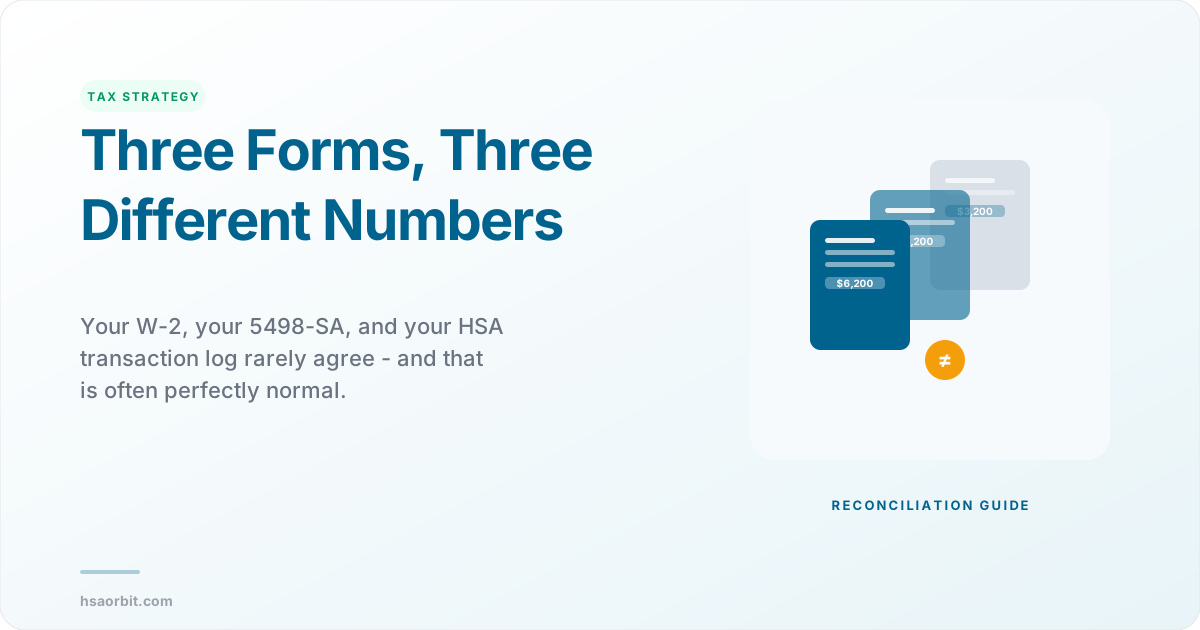
You pulled up your W-2, checked Box 12 Code W, then compared it to your Form 5498-SA, and the numbers do not match. If you are like most HSA holders, your next reaction is panic. An HSA contribution mismatch between your W-2 and 5498-SA is one of the most common sources of confusion during tax season, and the reality is that these two forms are often supposed to show different amounts. The problem is that nobody explains why. This guide walks you through every scenario that causes a W-2 vs 5498-SA mismatch, shows you how to use your HSA transaction log as the source of truth, and tells you exactly which number to put on Form 8889 so you can file with confidence.
Understanding the HSA contribution year mismatch between these forms is critical because the IRS receives both documents independently. If your Form 8889 does not reconcile with the data the IRS already has on file, you may receive a CP2000 notice requesting an explanation or additional tax. The good news is that most mismatches are perfectly normal and explainable. You just need to know what each form reports and why the numbers diverge.
Why Your W-2 and 5498-SA Almost Never Match
- Different reporting entities - your employer issues the W-2, your HSA custodian issues the 5498-SA
- Different reporting periods - the W-2 reports calendar-year payroll activity, the 5498-SA reports all deposits received including prior-year contributions
- Different scope - the W-2 shows only payroll contributions, the 5498-SA shows all contributions from any source
- Different timing - a December payroll deduction may not reach your HSA custodian until January
What Your W-2 Box 12 Code W Actually Reports
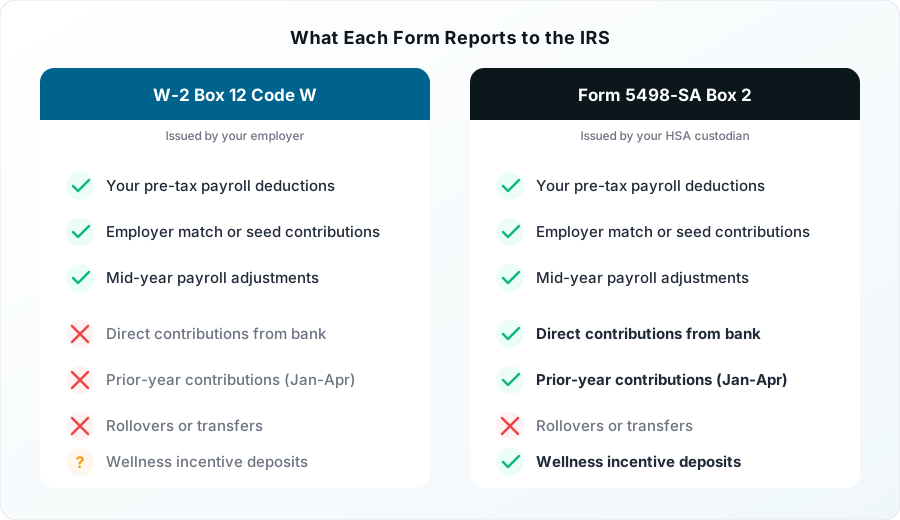
Your W-2 Box 12 Code W shows the total amount of HSA contributions made through your employer's payroll system during the calendar year. This single number includes both your pre-tax salary reduction and any employer match or seed contribution. The IRS treats all payroll HSA contributions as "employer contributions" for reporting purposes, even the portion that came from your paycheck.
This is a Section 125 cafeteria plan mechanism. When you elect HSA contributions through payroll, you are technically reducing your salary before taxes are calculated. The employer then sends that money to your HSA custodian on your behalf. From the IRS perspective, the employer made the contribution. That is why the money never appears in your Box 1 wages and why you do not claim it as a deduction on your return.
Here is what Box 12 Code W does and does not include:
Included in Code W:
- Your pre-tax payroll HSA deductions
- Your employer's HSA match or seed contributions
- Any mid-year adjustments processed through payroll
Not included in Code W:
- Direct contributions you made from your personal checking account
- Prior-year contributions you made between January 1 and April 15
- Rollovers or trustee-to-trustee transfers from another HSA
- Wellness incentive deposits (in some cases)
If you only contributed through payroll, your W-2 Box 12 Code W represents the complete picture of your HSA activity for the year. But if you made any contributions outside of payroll, this number will be lower than your total contributions for the year.
Good to Know
Employer reporting penalties exist for inaccurate W-2s. If your employer reports the wrong amount in Box 12 Code W, penalties range from $50 to $310 per form depending on how quickly the error is corrected. If you believe your W-2 is wrong, request a corrected W-2 (Form W-2c) from your employer immediately.
What Form 5498-SA Tells the IRS About Your HSA Contributions
Form 5498-SA is issued by your HSA custodian, not your employer. It reports all contributions deposited into your HSA account, regardless of the source. Your custodian must file this form with the IRS by May 31 of the year following the tax year, which means you may not receive your copy until late May or early June.
The key boxes on Form 5498-SA are:
- Box 1: Total contributions received during the calendar year (January 1 through December 31)
- Box 2: Total contributions for the tax year (includes prior-year contributions made January 1 through April 15)
- Box 3: Total contributions designated as prior-year contributions (the portion of Box 2 that was made in the current calendar year but designated for the prior tax year)
The distinction between Box 1 and Box 2 is where most confusion starts. Box 2 is the tax-year figure. It includes prior-year contributions that arrived between January 1 and April 15. Box 3 tells you how much of Box 2 was designated for the prior year.
The formula to determine your actual tax-year contributions from the 5498-SA is:
Tax-year contributions = Box 2 - Box 3 + (prior year's Box 3)
This formula accounts for the fact that the 5498-SA reports by deposit date, not by tax year. If you made a contribution in February 2026 designated for the 2025 tax year, it appears in the 2026 Form 5498-SA (in Box 2 and Box 3) but belongs on your 2025 Form 8889.
Important
You do not need to wait for your 5498-SA to file your taxes. This form arrives after the April 15 filing deadline. Use your W-2 Box 12 Code W for payroll contributions, your HSA portal transaction history for direct contributions, and file on time. The 5498-SA is a verification document, not a filing requirement.
Why Your W-2 and 5498-SA HSA Amounts Do Not Match
There are seven common scenarios that cause a legitimate mismatch between your W-2 and 5498-SA. Understanding which scenario applies to you determines whether you need to take action or simply file your return as planned.
Scenario 1: You Made Direct Contributions Outside of Payroll
This is the most common reason for a mismatch. If you wrote a personal check or made an electronic transfer directly to your HSA outside of payroll, those contributions appear on the 5498-SA but not on your W-2. Your 5498-SA will show a higher total than your W-2 Box 12 Code W.
Example: Your W-2 Code W shows $2,400 in payroll contributions. You also made a $1,000 direct contribution in March. Your 5498-SA Box 2 shows $3,400. The $1,000 difference is your direct contribution, which you report on Form 8889 Line 2 as your personal contribution.
Scenario 2: Prior-Year Contributions Cross the Calendar Boundary
If you made a contribution between January 1 and April 15 and designated it for the prior tax year, the 5498-SA for the current year includes that amount in Box 2 and Box 3. It does not appear on either year's W-2.
Example: In February 2026 you make a $500 direct contribution designated for tax year 2025. Your 2026 Form 5498-SA Box 2 includes the $500, and Box 3 shows $500 as a prior-year contribution. Your 2025 W-2 does not include this $500 at all because it was not a payroll contribution.
Scenario 3: December Payroll Timing Lag
Your employer deducted HSA contributions from your December paycheck, but the money did not reach your HSA custodian until January. The W-2 reports it in the year the deduction was taken (December). The 5498-SA may report it in the year the deposit was received (January). This creates a situation where the W-2 shows more than the 5498-SA for one year and less for the next.
Scenario 4: You Changed HSA Custodians Mid-Year
If your employer switched HSA providers during the year, you will receive two 5498-SA forms, one from each custodian. Neither form alone will match your W-2. You must add both 5498-SA amounts together to get the full picture.
Scenario 5: Your Employer Reported the W-2 Incorrectly
Some employers make reporting errors. Common mistakes include reporting only the employee portion instead of the combined employee-plus-employer total, or including HSA amounts in Box 1 wages when they should be excluded. If you compare your W-2 Box 12 Code W to your year-end pay stubs and the numbers do not match, contact your employer and request a corrected W-2 (Form W-2c).
Scenario 6: Wellness Incentive Deposits
Some employer wellness programs deposit rewards directly into your HSA. These deposits may appear on the 5498-SA as contributions but may or may not be included in your W-2 Box 12 Code W depending on how your employer structures the program. Check with your benefits department if you see unexpected amounts on the 5498-SA.
Scenario 7: Administrative or Custodian Fees
Certain HSA custodians include administrative fees paid by the employer in the contribution total on the 5498-SA. The W-2 typically excludes these fees from Box 12 Code W. This creates a small mismatch that is difficult to identify without checking the HSA portal transaction log.
How to Use Your HSA Transaction Log to Reconcile the Numbers
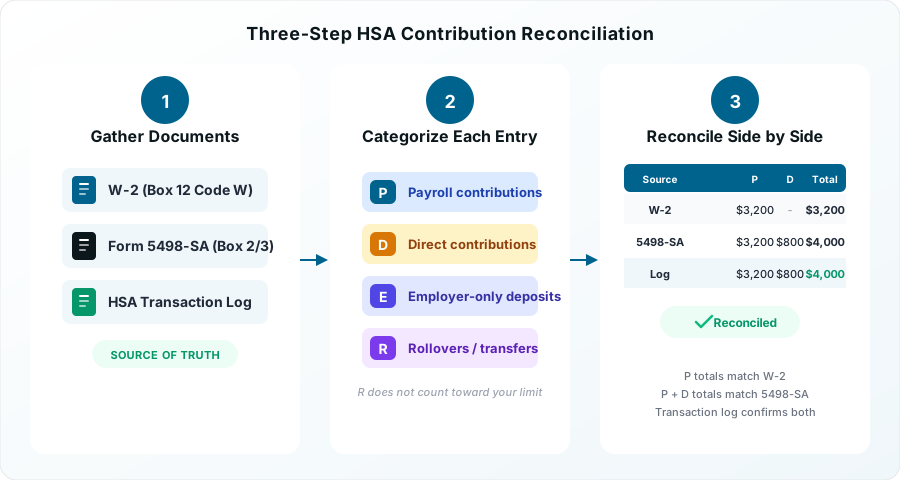
Your HSA portal transaction log is the source of truth that bridges the gap between your W-2 and your 5498-SA. Here is a three-step reconciliation process that will identify exactly where the numbers diverge and confirm whether your contributions are correct.
Step 1: Gather Your Documents
You need three items: your W-2 (Box 12 Code W), your Form 5498-SA (if available), and your HSA account transaction history for the full calendar year. You can download the transaction history from your HSA provider's website. Filter for contribution transactions only, excluding distributions and investment activity.
Step 2: Categorize Every Contribution
Go through each contribution in your transaction log and label it:
- P for payroll contributions (these match to your W-2)
- D for direct contributions (these are amounts you contributed from your bank account)
- E for employer-only deposits (seed contributions, wellness rewards, or match amounts that came directly from your employer outside your paycheck)
- R for rollovers or transfers from another HSA (these are not contributions and should not appear on either form)
Add up all "P" entries. This total should match your W-2 Box 12 Code W. If it does not match, you likely have a timing issue (Scenario 3) or a W-2 reporting error (Scenario 5).
Add up all "P" plus "D" plus "E" entries (excluding "R" rollovers). This total should approximate your 5498-SA Box 2 (adjusted for any prior-year contributions in Box 3).
Step 3: Build the Reconciliation Worksheet
Use this format to see all three data sources side by side:
| Source | Payroll | Direct | Employer Extra | Rollover | Total |
|---|---|---|---|---|---|
| W-2 Box 12 Code W | $3,200 | N/A | Included | N/A | $3,200 |
| 5498-SA Box 2 | $3,200 | $800 | $200 | $0 | $4,200 |
| Transaction Log | $3,200 | $800 | $200 | $2,000 | $6,200 |
In this example, the W-2 shows $3,200 (payroll only). The 5498-SA shows $4,200 (payroll plus direct plus employer wellness deposit). The transaction log shows $6,200 (everything including a $2,000 rollover from a previous HSA). The rollover is not a contribution and does not count toward your annual limit. It should appear on Form 8889 Line 14b as a rollover, not as a contribution.
The amounts that matter for your tax return: $3,200 goes on Form 8889 Line 9 (from the W-2). $800 goes on Form 8889 Line 2 (your direct contributions). The $200 wellness deposit goes on Line 9 if it was included in Code W, or on Line 2 if it was not.
Verify your contribution limit to confirm your total contributions do not exceed the annual maximum before filing.
Pro Tip
Save your transaction log as a PDF. Download your HSA transaction history each year before your custodian archives or removes access to prior years. This is your best evidence if the IRS ever questions your Form 8889 figures. The IRS does not require you to submit it with your return, but you should keep it for at least three years.
Mid-Year Job Change: Reconciling Multiple W-2s and 5498-SA Forms
Changing employers mid-year is one of the most complex HSA reconciliation scenarios. You may end up with two W-2s (one from each employer), two 5498-SA forms (one from each HSA custodian), and a prorated contribution limit that further complicates the math.
Start by adding the Box 12 Code W amounts from both W-2s. The combined total represents your total payroll HSA contributions for the year. This combined amount goes on Form 8889 Line 9.
Next, add the Box 2 amounts from both 5498-SA forms. This is your total HSA contributions from all sources for the year. Subtract any prior-year amounts shown in Box 3 from either form.
The critical step is verifying that your total contributions (payroll plus direct) do not exceed your annual limit. If you had self-only HDHP coverage all year, your 2025 limit is $4,300. If you switched from self-only to family coverage mid-year (or vice versa), you must prorate your limit based on the months of each coverage type, unless you qualify for the last-month rule.
Example: Jake left Company A in June and joined Company B in July. Both employers offered HDHP self-only coverage.
- Company A W-2 Code W: $1,800 (January through June payroll contributions)
- Company B W-2 Code W: $1,600 (July through December payroll contributions)
- Company A 5498-SA Box 2: $1,800
- Company B 5498-SA Box 2: $2,100 (includes $500 Jake contributed directly in August)
- Total payroll: $3,400 (Form 8889 Line 9)
- Total direct: $500 (Form 8889 Line 2)
- Total contributions: $3,900 (under the $4,300 limit)
Jake's W-2s combined ($3,400) do not match either 5498-SA alone, but when he adds both 5498-SA forms and separates payroll from direct contributions, everything reconciles perfectly.
Important
Watch for double employer contributions. If both employers offered HSA matching or seed contributions, verify that the combined employer amounts plus your contributions do not exceed the annual limit. Employer contributions count toward the same cap. If you exceeded the limit, you need to withdraw the excess by April 15 to avoid the 6% excise tax.
Which Number Goes on Form 8889: W-2 vs 5498-SA
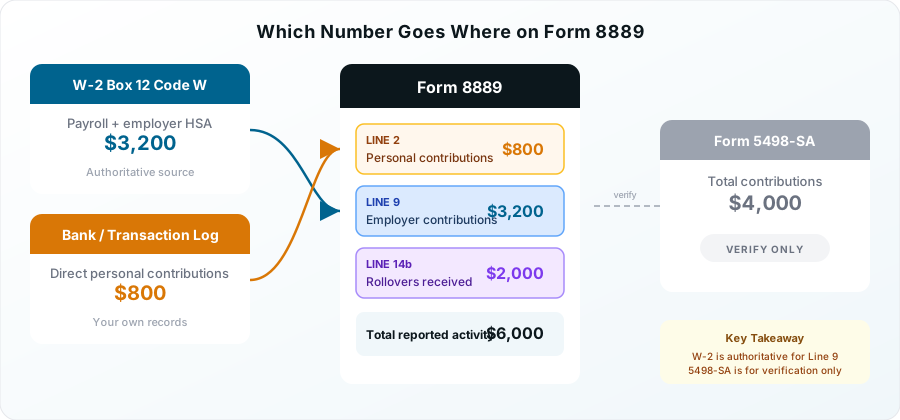
When you sit down to complete Form 8889, you need to know exactly which number from which form goes on each line. Here is the mapping:
Form 8889 Line 2 - Your personal contributions: Enter only the amounts you contributed directly to your HSA outside of payroll. This comes from your transaction log, not from either tax form. Do not include any amount already reported in W-2 Box 12 Code W. If all your contributions were through payroll, this line is zero.
Form 8889 Line 9 - Employer and payroll contributions: Enter the amount from your W-2 Box 12 Code W. If you have multiple W-2s, add them together. The W-2 is the authoritative source for this line, not the 5498-SA.
Form 8889 Line 14b - Rollovers and transfers: If your transaction log shows a rollover from another HSA, report it here. This amount appears on the 5498-SA but is not a contribution and does not count toward your annual limit.
The 5498-SA is a verification document. You do not transfer any number from it directly to Form 8889. Instead, use it to confirm that your W-2 and transaction log data are consistent with what your custodian reported to the IRS. If the 5498-SA arrives in May and shows different numbers than what you filed, evaluate whether the difference is one of the seven normal scenarios described above or an actual error that requires an amendment.
Check which expenses qualify for HSA reimbursement to verify you are only using distributions for qualified medical expenses.
When the Mismatch Means an Actual Error and How to Fix It
Most W-2 vs 5498-SA mismatches are normal. But sometimes the mismatch reveals a genuine problem that requires action. Here is how to identify and fix real errors before they trigger an IRS notice.
Your W-2 Box 12 Code W Is Wrong
Compare your W-2 Box 12 Code W to your final December pay stub's year-to-date HSA contribution total. If they do not match, your employer made a reporting error. Contact your HR or payroll department and request a corrected W-2 (Form W-2c). Do not file your taxes with the incorrect W-2 amount.
Your 5498-SA Shows the Wrong Amount
Compare the 5498-SA Box 2 to your HSA transaction log total (excluding rollovers). If the custodian reported an incorrect amount, contact them to request a corrected 5498-SA. Custodians can issue corrected forms directly to the IRS.
You Exceeded the Annual Contribution Limit
If your reconciliation reveals that your total contributions (payroll plus direct) exceed the annual limit ($4,300 self-only or $8,550 family for 2025), you have an excess contribution problem. You must withdraw the excess plus any earnings on it before April 15, 2026, to avoid the 6% excise tax that applies every year the excess remains in the account.
Contact your HSA custodian and request a "return of excess contribution." The custodian will calculate any earnings attributable to the excess and distribute both amounts back to you. You will receive a Form 1099-SA showing the distribution with code 2 (excess contribution returned).
You Already Filed and the 5498-SA Shows a Problem
If your 5498-SA arrives in May and reveals that your total contributions were different than what you reported on Form 8889, evaluate whether the discrepancy is material. If the correct amount would change your tax liability (for example, you had excess contributions you did not know about), you may need to file an amended return using Form 1040-X with a corrected Form 8889.
If the discrepancy is due to timing (Scenario 3) and the correct tax-year total matches what you filed, no amendment is needed.
Good to Know
The IRS automated matching system compares your Form 8889 to both your W-2 and the 5498-SA your custodian filed. If the numbers do not reconcile, you may receive a CP2000 notice months or even years after filing. Keeping your reconciliation worksheet on file gives you the documentation to respond quickly and avoid penalties.
Frequently Asked Questions
Q: Why is my 5498-SA higher than my W-2 Box 12 Code W?
The most common reason is that you made direct contributions to your HSA outside of payroll. Your W-2 only reports payroll contributions, while the 5498-SA reports all contributions from every source. The difference should equal your direct contributions, any employer wellness deposits not included in Code W, or prior-year contributions you made between January 1 and April 15.
Q: Which HSA number do I use on Form 8889, the W-2 or the 5498-SA?
Use your W-2 Box 12 Code W for Form 8889 Line 9 (employer and payroll contributions). Use your personal records for Line 2 (direct contributions only). The 5498-SA is a verification document and you do not transfer numbers from it directly to Form 8889.
Q: Will the IRS flag me if my W-2 and 5498-SA amounts are different?
Not automatically. The IRS expects these forms to show different amounts when you have direct contributions, prior-year contributions, or rollovers. However, if your Form 8889 does not reconcile with both forms in a logical way, you may receive a CP2000 notice requesting an explanation. Documentation from your HSA transaction log resolves most of these notices.
Q: Do I need my 5498-SA to file my taxes?
No. The 5498-SA is not issued until May 31, well after the April 15 filing deadline. Use your W-2 Box 12 Code W for payroll contributions and your HSA portal transaction history for direct contributions. File on time and use the 5498-SA to verify your figures when it arrives.
Q: What happens if I changed HSA custodians mid-year and have two 5498-SA forms?
Add the Box 2 amounts from both forms to get your total contributions. Subtract any Box 3 amounts (prior-year contributions). Compare the combined total to your W-2 Box 12 Code W plus any direct contributions. Each custodian only reports the contributions they received, so neither form alone tells the full story.
Q: Do I need an amended return if my W-2 HSA amount is wrong?
If you have not filed yet, request a corrected W-2 (Form W-2c) from your employer before filing. If you already filed with the incorrect amount, you may need to file Form 1040-X with a corrected Form 8889. Whether an amendment is necessary depends on whether the error changes your tax liability. A small timing difference usually does not require an amendment, but a significant overstatement or understatement of contributions does.
Q: What causes an HSA contribution year mismatch between forms?
The most common cause is a December payroll deduction that does not reach your HSA custodian until January. The W-2 reports it in the year the deduction was taken, but the custodian may report it as a deposit received in the following year. Prior-year contributions made between January 1 and April 15 also create year mismatches because they appear on the current year's 5498-SA but belong on the prior year's Form 8889.
Written by
Michael is a Certified Public Accountant and IRS Enrolled Agent who has spent 12 years helping individuals and businesses navigate tax-advantaged health accounts. He leads HSA Orbit's tax strategy content.