The best HSA contribution tracking apps do more than record deposits. They monitor your progress against IRS limits, store receipts for tax-free reimbursements years from now, and connect directly to Form 8889 at tax time. With 2026 contribution limits set at $4,400 for self-only and $8,750 for family coverage, staying on top of your HSA requires the right tracking tool. Whether you prefer a dedicated app, your provider's built-in features, a personal finance platform, or a simple spreadsheet, this guide compares every option so you can find the one that fits how you actually manage money.
2026 HSA Contribution Limits
Self-only: $4,400. Family: $8,750. Catch-up (55+): Additional $1,000. Contribution deadline: April 15, 2027. Over-contributing triggers a 6% excise tax every year until corrected.
Why You Need an HSA Contribution Tracking App
An HSA is the only account in the tax code with a triple tax advantage - contributions are tax-deductible, growth is tax-free, and withdrawals for qualified medical expenses are tax-free. But those benefits only work if you track two things accurately: how much you put in and how much you take out.
Contribution Tracking Prevents Penalties
The IRS sets strict annual limits. For 2026, you can contribute up to $4,400 with self-only HDHP coverage or $8,750 with family coverage. If you are 55 or older, add another $1,000. Go over those limits by even a dollar and you owe a 6% excise tax on the excess - every single year until you fix it.
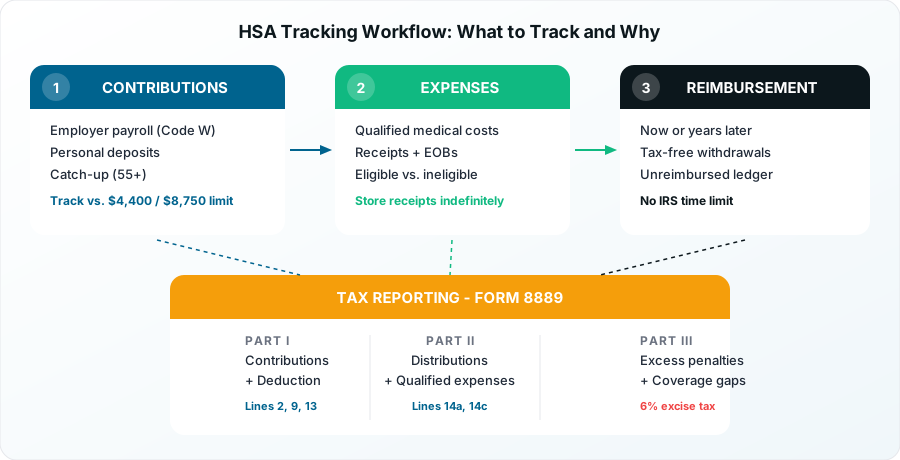
Tracking gets complicated when contributions come from multiple sources. Your employer deducts pre-tax contributions from your paycheck (reported on your W-2 Box 12 Code W). You might also make personal contributions directly to your HSA. Both count toward the same annual limit. Without a system to track the combined total, over-contributing is easy.
Expense Tracking Unlocks the HSA Super-Saver Strategy
The real power of HSA tracking goes beyond contributions. The smartest HSA strategy is to pay medical expenses out of pocket today, let your HSA investments grow tax-free for decades, and then reimburse yourself later. This approach can turn your HSA into a retirement powerhouse.
But it only works if you keep receipts. The IRS has no time limit on when you can reimburse yourself from your HSA, as long as the expense occurred after you opened the account. That means you might need to produce a receipt from 2026 in the year 2046. A good tracking tool stores those receipts digitally, links them to specific expenses, and keeps everything organized for whenever you decide to reimburse.
2026 Brings New Tracking Needs
The One, Big, Beautiful Bill Act expanded HSA eligibility in 2026. Bronze and catastrophic Exchange plans are now HSA-compatible, direct primary care arrangements work alongside HSAs, and telehealth coverage no longer disqualifies you. If you switched plan types or added DPC this year, your tracking tool needs to handle the transition - including pro-rated contribution limits if your eligibility changed mid-year.
Best Dedicated HSA Tracking Apps Compared
These apps are built specifically for HSA management. They understand IRS rules, eligible expenses, and tax reporting requirements in ways that general finance apps do not.
Reimbursable - Best for Tax Season Integration
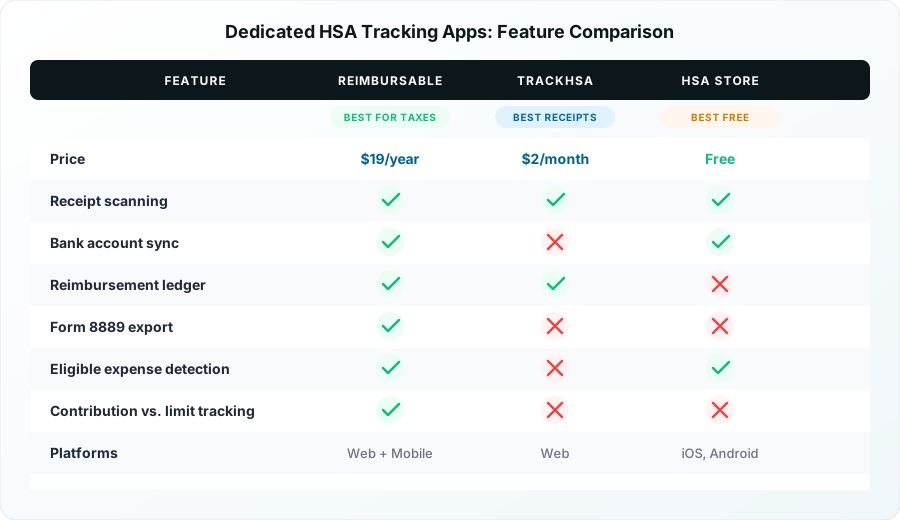
Reimbursable costs $19 per year and is the only HSA tracker that auto-fills Form 8889 data. It connects to your bank accounts to automatically find out-of-pocket medical expenses, stores receipts, tracks distributions, and generates reports formatted for tax filing.
What sets Reimbursable apart is its focus on the long-term reimbursement strategy. It maintains a running ledger of unreimbursed qualified expenses, so you always know exactly how much you can withdraw tax-free at any time. For HSA holders who pay out of pocket and plan to reimburse years later, this solves the hardest tracking problem.
TrackHSA - Best for Receipt Organization
TrackHSA costs $2 per month (with a 30-day free trial) and focuses on receipt management. You can upload unlimited receipts, mark whether expenses were paid from your HSA or out of pocket, and sort everything by year. Cloud backup and SSL encryption protect your data.
TrackHSA works well for people who want a dedicated, no-frills receipt vault. It does not connect to bank accounts or auto-categorize expenses, but its manual entry approach gives you full control over how expenses are recorded.
HSA Store ExpenseTracker - Best Free Option
The HSA Store ExpenseTracker is completely free on iOS and Android. It connects to retailer accounts (Amazon, Target, CVS, Walgreens), scans receipts, identifies HSA-eligible purchases, and generates spending reports for tax time.
The trade-off is that it is designed primarily for expense tracking, not contribution monitoring. It will help you categorize and store receipts but will not track your contributions against IRS limits. For users who just need receipt management and eligible expense identification, it is hard to beat at zero cost.
Pro Tip
Match the tool to your strategy. If you reimburse immediately from your HSA, a free receipt tracker is enough. If you pay out of pocket and plan to reimburse later, invest in a tool like Reimbursable that maintains a long-term reimbursement ledger.
AI-Powered HSA Apps - The New Wave
A new generation of AI-powered HSA tools is emerging. Silver uses AI to identify eligible items across 200,000+ products and auto-collects receipts from Amazon, Costco, Target, and pharmacies. It charges 4% of claim amounts. Prosaver (iOS) uses AI receipt scanning to extract CPT codes and create transactions automatically. HSA Vault extracts data from receipts and insurance documents using AI.
These tools are newer and less proven than established options, but they represent where HSA tracking is heading. If you spend heavily on eligible items and want automated categorization, they are worth evaluating.
HSA Provider Apps: Built-In Tracking Features
Your HSA custodian already offers a mobile app with tracking capabilities. For many people, the built-in tools are sufficient - especially if you use your HSA debit card for most medical expenses and do not need long-term reimbursement tracking.
Fidelity HSA
Fidelity charges $0 monthly fees and offers the most complete provider app. You get account management, debit card controls, BillPay, tax document access, and full investment tracking. Fidelity's investment platform is the strongest in the HSA space, with commission-free access to stocks, bonds, mutual funds, and ETFs, plus Fidelity Go managed portfolios at 0.35% for balances over $25,000.
The app tracks contributions against your annual limit and shows your year-to-date total. Tax documents (Form 5498-SA, Form 1099-SA) are available in-app. The limitation is receipt storage - Fidelity does not offer built-in receipt capture or expense categorization. You will need a separate tool for that.
Lively
Lively also charges $0 monthly fees and includes receipt capture, quick reimbursements, spending insights, and an AI assistant directly in the app. Investment options include Schwab self-directed brokerage (free above $3,000 balance, $24/year below) and Devenir guided portfolios at 0.5% annually.
Lively's app is the most feature-rich among provider apps for tracking purposes. The built-in receipt capture means you may not need a third-party tracker at all. The AI assistant can answer questions about eligible expenses, which is helpful for borderline purchases.
HealthEquity
HealthEquity charges no monthly fee but has a 0.03% investment fee capped at $10 per month. The app supports photo claims, payment and reimbursement processing, debit card linking, and investment management. It is functional but has lower user ratings (3.4-3.5 stars) compared to Fidelity and Lively.
HSA Bank
HSA Bank offers a mobile app with online banking, debit card management, and investment access. Fees vary and typically include maintenance charges unless you maintain a minimum balance. HSA Bank is common in employer-sponsored plans, so you may already have access through your workplace benefits.
Good to Know
Provider apps track balances, not strategy. Your HSA provider app is great for monitoring your balance and contribution total. But if you pay medical expenses out of pocket and want to reimburse later, you need a separate receipt tracking system. Provider apps do not maintain a ledger of unreimbursed expenses.
Free vs. Paid HSA Expense Trackers: What to Look For
Not every HSA holder needs a paid tracking tool. The right choice depends on how you use your account.
When Free Tools Are Enough
If you use your HSA debit card for every medical expense and reimburse immediately, your provider app plus the free HSA Store ExpenseTracker covers your needs. Your provider tracks contributions and distributions. The ExpenseTracker identifies eligible purchases and stores receipts. Total cost: $0.
Free tools also work well if you have a simple HSA setup - one employer, one HSA, self-only coverage, and straightforward medical expenses like copays, prescriptions, and dental visits.
When Paid Tools Pay for Themselves
Paid trackers ($2-19/year) make sense in three scenarios:
You follow the HSA super-saver strategy. Paying out of pocket and reimbursing later requires a reliable ledger that connects receipts to specific expenses across years or decades. A tool like Reimbursable maintains this ledger automatically. The $19/year cost is trivial compared to the tax savings from optimizing your reimbursement timing.
You have a complex HSA situation. Multiple HSAs from job changes, family coverage with a spouse who also has an HSA, or catch-up contributions at age 55+ all add tracking complexity. Dedicated tools handle these scenarios better than provider apps.
You want Form 8889 integration. If your Form 8889 filing is stressful, a tool that auto-fills or exports data for the form saves time and reduces errors. This is especially valuable if you made both employer and personal contributions, had mid-year coverage changes, or took distributions during the year.
Key Features to Compare
When evaluating any HSA tracking tool, check for these capabilities:
| Feature | Why It Matters |
|---|---|
| Contribution tracking vs. limits | Prevents over-contributing and the 6% excise tax |
| Receipt scanning and storage | Preserves proof for IRS-compliant reimbursements |
| Eligible expense identification | Prevents non-qualified withdrawals (20% penalty + income tax) |
| Reimbursement ledger | Tracks unreimbursed expenses for future tax-free withdrawals |
| Tax form export (Form 8889) | Simplifies annual tax filing and reduces errors |
| Bank/provider account sync | Automates transaction import and reduces manual entry |
How to Track HSA Contributions With a Spreadsheet
Spreadsheets remain the most flexible HSA tracking option. They cost nothing (or close to it), you control every field, and they work regardless of which HSA provider you use.
Free Templates to Get Started
Several free templates are available:
- Young Adult Money HSA Template - Tracks medical expenses by provider, type, and date alongside contribution amounts
- Tiller Community HSA Template - Auto-pulls HSA-tagged transactions from linked bank accounts into Google Sheets (requires Tiller Money subscription at $79/year)
- HSA Edge Spreadsheet - Summarizes out-of-pocket qualified medical expenses for reimbursement tracking
You can also build your own in Google Sheets or Excel with columns for date, provider, expense type, amount, payment method (HSA card vs. out-of-pocket), receipt file link, and reimbursement status.
What Your Spreadsheet Should Track
At minimum, your HSA spreadsheet needs two sections:
Contribution tracker: Record every deposit with date, amount, source (employer payroll vs. personal), and running year-to-date total. Compare against your annual limit ($4,400 self-only or $8,750 family for 2026, plus $1,000 catch-up if 55+). Use our contribution calculator to verify your limit based on coverage type and eligibility months.
Expense tracker: Log every qualified medical expense with date, provider, description, amount, and how it was paid. If paid out of pocket, note it as "unreimbursed" and link to a stored receipt image. This becomes your reimbursement ledger.
Important
Keep receipts indefinitely. The IRS has no statute of limitations on HSA reimbursements, but you must prove the expense was qualified. Store digital copies of every receipt, EOB, and medical bill. A spreadsheet without supporting documents is not sufficient proof for the IRS.
Spreadsheet Limitations
The downside of spreadsheets is manual effort. You must enter every transaction, update totals, and manage receipt files yourself. There is no automated bank sync, no eligible expense identification, and no Form 8889 integration. For simple HSA situations, this is manageable. For complex ones (multiple HSAs, family plans, the super-saver strategy), a dedicated app saves significant time.
HSA Receipt Tracking: IRS Requirements You Should Know
The IRS does not require you to submit receipts when you file your tax return. But if you are ever audited, you must prove that every HSA distribution was used for a qualified medical expense. This makes receipt tracking a form of insurance - you may never need it, but if you do, not having it is extremely costly.
What Counts as Proof
According to IRS Publication 969, you should keep records that show:
- The amount of each distribution
- The medical expense it was used for
- That the expense was not reimbursed by insurance
- That the expense was incurred after the HSA was established
Acceptable documentation includes receipts, invoices, Explanation of Benefits (EOB) statements from your insurance company, and bank or credit card statements showing the payment.
How Long to Keep HSA Records
For standard HSA distributions, keep records for at least three years after filing the tax return that includes the distribution. But for the super-saver strategy - where you pay out of pocket and reimburse years later - you must keep receipts until you actually take the reimbursement, plus three more years after that.
If you pay a $500 dental bill out of pocket in 2026 and reimburse yourself from your HSA in 2040, you need the 2026 receipt until at least April 2044 (three years after filing your 2040 taxes). This is why digital receipt storage matters so much for long-term HSA planning.
Do You Need Receipts If You Use an HSA Debit Card?
Yes. Using your HSA debit card does not eliminate the record-keeping requirement. The debit card transaction proves you spent the money, but it does not prove the expense was medically qualified. You still need the itemized receipt or EOB showing what the payment was for.
How to Choose the Right HSA Tracking Software
The best tool depends on your HSA strategy, complexity, and budget. Here is a decision framework:
By User Type
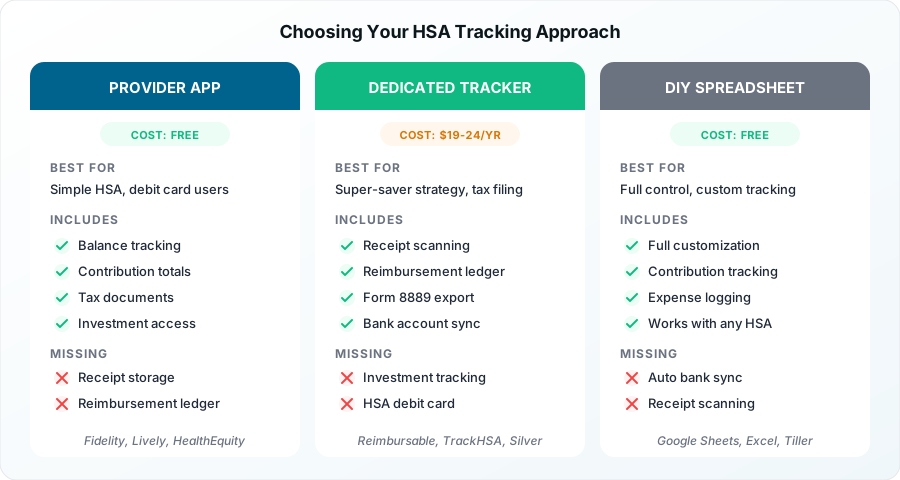
"Set it and forget it" users - You use your HSA debit card for every medical expense and never plan to reimburse later. Your provider app (Fidelity, Lively, HealthEquity) is sufficient. Cost: $0.
"I want everything automated" users - You want bank sync, auto-categorization, and tax form integration. Choose Reimbursable ($19/year) or Silver (4% of claims). These handle the heavy lifting so you do not have to think about tracking.
"I love spreadsheets" users - You want full control and customization. Use a free template or build your own. Pair it with your provider app for contribution monitoring. Cost: $0.
"Let AI handle it" users - You want cutting-edge automation for receipt scanning and eligible expense detection. Try Prosaver, HSA Vault, or Silver. These are newer but offer the most advanced features. Cost: varies.
"I just need the basics" users - You want free receipt tracking without complexity. HSA Store ExpenseTracker covers receipt scanning and eligible expense identification at no cost.
By HSA Complexity
Simple (one HSA, self-only, standard deductions): Provider app + free expense tracker. Total cost: $0.
Moderate (family coverage, payroll + personal contributions): Provider app + Reimbursable or TrackHSA. Total cost: $19-24/year.
Complex (multiple HSAs, mid-year changes, catch-up contributions, super-saver strategy): Reimbursable + spreadsheet for contribution tracking + provider app for investment monitoring. Total cost: $19/year.
Use our eligibility checker to confirm your HDHP qualifies for HSA contributions, and the contribution calculator to determine your exact limit based on coverage months.
HSA Contribution Limits for 2026
Accurate tracking starts with knowing your limits. Here are the current IRS figures per Revenue Procedure 25-19:
| Coverage Type | 2026 Limit |
|---|---|
| Self-only coverage | $4,400 |
| Family coverage | $8,750 |
| Catch-up contribution (age 55+) | +$1,000 |
Source: IRS Revenue Procedure. Limits include employer contributions.
If your HDHP coverage started or ended mid-year, your contribution limit is pro-rated by the number of months you were eligible. The last-month rule can override this - if you are HSA-eligible on December 1, you can contribute the full annual amount. But you must remain eligible through December 31 of the following year, or the excess becomes taxable income plus a 10% penalty.
Your tracking tool should account for these scenarios. Provider apps usually show a simple annual limit. If your situation involves mid-year changes, a spreadsheet or dedicated tracker gives you more precision.
Pro Tip
Check your year-to-date total now. Log into your HSA provider and note your current contribution total. If you changed jobs this year, add contributions from both accounts. Compare the combined total against your limit using our contribution calculator. Catching over-contributions before the tax deadline avoids the 6% penalty entirely.
Connecting Your Tracking Tool to Tax Season
The ultimate purpose of HSA tracking is making tax time painless. Every HSA holder must file Form 8889 with their tax return, regardless of whether contributions came through payroll or personal deposits.
What Form 8889 Needs From Your Tracking
Form 8889 has three parts. Your tracking tool should provide data for all of them:
Part I - Contributions: Your total contributions for the year (line 2), employer contributions from W-2 Box 12 Code W (line 9), and your HSA deduction (line 13). A good tracker separates employer from personal contributions so you do not accidentally double-count.
Part II - Distributions: Total distributions (line 14a) and how much was used for qualified medical expenses (line 14c). Your expense tracker with categorized, receipt-backed entries makes this straightforward.
Part III - Additional tax: If you had excess contributions or failed to maintain HDHP coverage, this section calculates penalties. A tracker that monitors your contributions against limits alerts you before this becomes an issue.
Which Tools Export for Tax Software
Currently, Reimbursable is the only dedicated HSA tracker that claims to auto-fill Form 8889 data. Most other tools export CSV files that you can reference while entering data into TurboTax, FreeTaxUSA, H&R Block, or other tax software. Provider apps provide Form 5498-SA and Form 1099-SA documents, which your tax software uses to verify reported amounts.
For the smoothest tax filing experience, use our HSA filing checklist alongside whichever tracking tool you choose. The checklist verifies all 10 critical fields on Form 8889 before you submit.