Track Every HSA Dollar. Stay Audit-Ready.
A free, professionally designed Google Sheet to log your HSA expenses, link receipts, and print tax-ready reports — built for people who take their Health Savings Account seriously.
Download the free Google Sheet template
Why Track HSA Expenses?
Most people use their HSA like a debit card — swipe and forget. But an HSA is one of the most powerful tax-advantaged accounts in the U.S. tax code, and proper expense tracking unlocks benefits that most account holders miss entirely. Whether you are spending HSA funds now or saving them for retirement, keeping a detailed expense log protects your money in three critical ways.
Tax Savings Protection
Every dollar you withdraw from your HSA for a qualified medical expense is tax-free — federal, state, and FICA. But if you cannot prove an expense was qualified, the IRS treats it as a non-qualified distribution: you owe income tax plus a 20% penalty if you are under 65. A detailed expense log with receipt links is your proof. Without it, you are gambling that the IRS will never ask.
Audit Protection
The IRS can audit your HSA distributions to verify they were used for qualified medical expenses. While HSA custodians report total distributions on Form 1099-SA, they do not report what the money was spent on — that burden falls on you. If audited, you need to produce documentation for every distribution: what the expense was, when it occurred, who the provider was, and how much it cost. An organized expense tracker with linked receipts makes this straightforward instead of stressful.
Future Reimbursement Strategy
Here is where expense tracking becomes truly powerful. The IRS has no time limit on HSA reimbursements — you can pay for a medical expense out of pocket today and reimburse yourself from your HSA years or even decades later, as long as you had the HSA open when the expense was incurred. This means you can let your HSA investments grow tax-free while accumulating a "reimbursement bank" of documented expenses. Some HSA holders accumulate tens of thousands of dollars in unreimbursed expenses that they can withdraw tax-free in retirement. But this strategy only works if you have meticulous records proving each expense and when it occurred.
Key takeaway
The IRS has no time limit on HSA reimbursements. Pay out of pocket today, let your HSA grow tax-free, and reimburse yourself years later. But only if you have the receipts to prove it.
Download the Free HSA Expense Tracker
Get the professionally designed Google Sheet with IRS-eligible categories, receipt linking, and print-ready tax reports — sent straight to your inbox.
What the IRS Requires You to Keep
IRS Publication 969 and Publication 502 outline what documentation you need to substantiate HSA distributions. For each qualified medical expense, you should retain records showing:
Date
When the expense was incurred
Amount
The exact dollar amount paid
Provider
Who provided the service or product
Description
What the medical expense was for
Proof of payment
Receipt, EOB, or bank statement
Medical necessity
For items that could be personal use
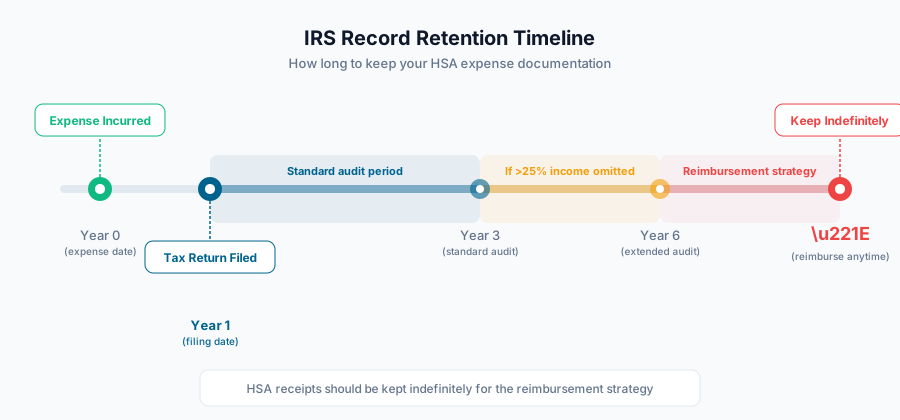
How long to keep records
The IRS can audit returns up to 3 years after filing (6 years if more than 25% of income is omitted). But if you are using the future reimbursement strategy, keep your records indefinitely — you will need them whenever you decide to reimburse yourself.
What's Inside the Tracker
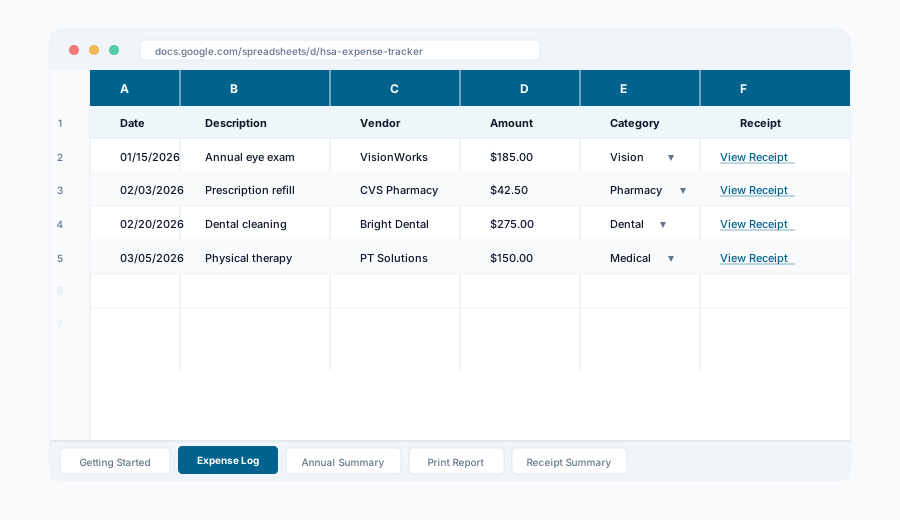
The HSA Orbit Expense Tracker is a 5-tab Google Sheet designed to handle everything from daily expense logging to annual tax reporting. Each tab serves a specific purpose in your expense management workflow.
Getting Started
Step-by-step setup instructions: create your receipts folder, learn the naming convention, and start tracking in under 2 minutes.
Expense Log
The main tracking sheet with columns for date, description, vendor, amount, IRS-eligible category dropdowns, payment method, receipt links, and notes.
Annual Summary
Auto-calculated breakdown by expense category with totals, monthly trends, and a comparison against your annual contribution limit.
Print Report
A formatted annual expense report grouped by category with subtotals — designed for clean PDF export via File > Print.
Receipt Summary
A cover sheet mapping every expense to its receipt filename. Hand this to your tax preparer or keep it for IRS audit records.
Pre-Built IRS-Eligible Categories
The expense log includes a dropdown with 14 pre-populated IRS-eligible expense categories so you never have to guess what qualifies:
How to Use the Tracker
Get your copy
Enter your email below to get the Google Sheet link. Open it and go to File > Make a Copy to save your own editable version in your Google Drive.
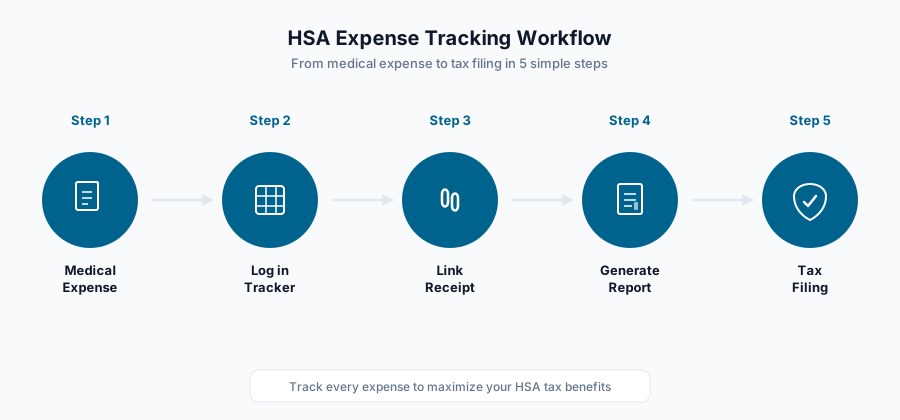
Create your receipts folder
In Google Drive, create a folder called "HSA Orbit - Receipts". This is where you'll upload photos or scans of all your medical receipts.
Log each expense
When you have a medical expense, add a row: date, description, vendor, amount, and select the IRS category from the dropdown. Upload the receipt to your folder and paste the Google Drive link.
Name your receipts consistently
Use the format YYYY-MM-DD_Vendor_Amount.jpg (e.g., 2026-03-07_CVS_24.99.jpg). This makes receipts easy to find and the Receipt Summary tab can display the filename.
Print your annual report
At tax time, select your year in the dropdown, then go to the Print Report tab and export as PDF. Print the Receipt Summary tab as a cover sheet for your tax preparer.
Keep it updated
Log expenses as they happen — it takes 30 seconds per entry. At year-end, your report is already done. No scrambling during tax season.
Frequently Asked Questions
Is this completely free?
Yes. The HSA Orbit Expense Tracker is 100% free. There are no premium tiers, no trial periods, and no hidden costs. We built it to help the HSA community track expenses properly.
Do I need a Google account?
Yes. The tracker is a Google Sheet, so you need a Google account to make a copy and use it. Once you make a copy, it lives in your own Google Drive and you have full control over it.
How do I attach receipts?
Create a folder called "HSA Orbit - Receipts" in your Google Drive. Upload your receipt photos there with the naming convention YYYY-MM-DD_Vendor_Amount.jpg. Then right-click the file, select "Get link", and paste it into the Receipt Link column. The sheet will display a clean clickable "View Receipt" link.
Can I use this for multiple tax years?
Yes. The tracker has a year selector dropdown that updates contribution limit references automatically. You can log expenses for any year in the same sheet. The Print Report and Receipt Summary tabs filter by your selected year.
How do I print the report for my tax preparer?
Select the Print Report tab, then go to File > Print or File > Download > PDF. The tab is pre-formatted for clean printing with category groupings, subtotals, and a grand total. Print the Receipt Summary tab as a cover sheet to map each expense to its receipt.
Is my email address safe?
We use your email only to send you the tracker link and occasional HSA tips. We never sell, share, or rent your email to third parties. You can unsubscribe at any time with one click. Read our full privacy policy for details.
Download the Free HSA Expense Tracker
Get the professionally designed Google Sheet with IRS-eligible categories, receipt linking, and print-ready tax reports — sent straight to your inbox.
Related Tools
Expense Checker
Not sure if an expense is HSA-eligible? Use our AI-powered checker to verify any medical expense against IRS guidelines instantly.
Use ToolContribution Calculator
Calculate your maximum HSA contribution, estimate tax savings across federal, state, and FICA, and see your real paycheck impact.
Use ToolDisclaimer: This tool provides general information based on publicly available IRS guidelines and is intended for educational purposes only. It does not constitute tax, legal, or financial advice. Individual circumstances vary. The expense categories included are based on IRS Publication 502 but may not cover every eligible expense. Consult a qualified tax professional before making decisions about your Health Savings Account. HSA Orbit is not responsible for any actions taken based on the information provided in this tracker.